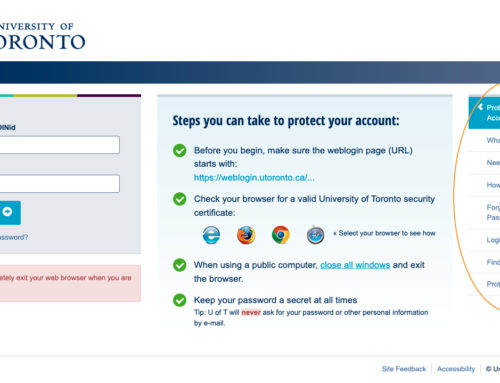
University of Toronto weblogin (UTORweblogin) is the single sign-on page you use to access the Portal, UTmail+, campus wireless, and most other U of T online services. You’ll need either a UTORid (students, staff, faculty) or a JOINid (applicants) to log in. This guide covers the login steps, what to do if you’re locked out, and how to protect your account.
What Is Weblogin?
Weblogin is U of T’s single sign-on (SSO) service: log in once at weblogin.utoronto.ca with your UTORid/JOINid and password, and you’re authenticated for the Portal, webmail, and every other weblogin-enabled service without logging in again separately.
1Go to the Official Weblogin URL
Navigate directly to https://weblogin.utoronto.ca/. Confirm the address bar starts with exactly this URL and shows a valid University of Toronto security certificate before entering anything.
2Enter Your UTORid or JOINid
In the first field, enter your UTORid or your JOINid. Students, staff, and faculty use a UTORid, issued during registration (it’s printed on your TCard). Applicants who haven’t been issued a UTORid yet use a JOINid instead.
3Enter Your Password
Enter your UTORid or JOINid password. Because weblogin is single sign-on, this is the same password you’ll use across every weblogin-enabled service.
4Click Log In
Submit the form. A successful login authenticates your session for weblogin.utoronto.ca and every connected service you visit afterward.
5Access Connected Services
Once logged in, move to the Portal, UTmail+ webmail, or UTORcwn campus wireless without logging in again — they all trust the same weblogin session.
6Log Out by Fully Exiting Your Browser
Weblogin has no separate logout button — it relies on browser cookies. Close every browser window to end your session, especially on shared or public computers.
https://weblogin.utoronto.ca/ and check for a valid security certificate before entering credentials. U of T will never request your password by email.FAQ
What’s the difference between a UTORid and a JOINid?
A UTORid is issued to registered students, staff, and faculty and works across most U of T services. A JOINid is issued to applicants who haven’t been assigned a UTORid yet, typically during admissions.
What do I do if I forgot my UTORid password?
If you’re registered with the UTORid Account Recovery Service, use the password reset tool with your alternate email or phone. If not registered, visit your campus help desk (St. George, UTM, or UTSC) in person.
What do I do if I forgot my JOINid password?
Applicants can reset a JOINid password directly through the JOINid password reset page, without visiting a help desk.
Is University of Toronto weblogin free to use?
Yes. It’s the free, built-in single sign-on system for anyone with a valid UTORid or JOINid.
Can I log in to weblogin from outside Canada?
Yes. Weblogin is accessible from any location with internet access — it isn’t restricted to on-campus networks.